Audit Log and Support
 Updated
by Dawid Kaczmarek
Inspect an operation
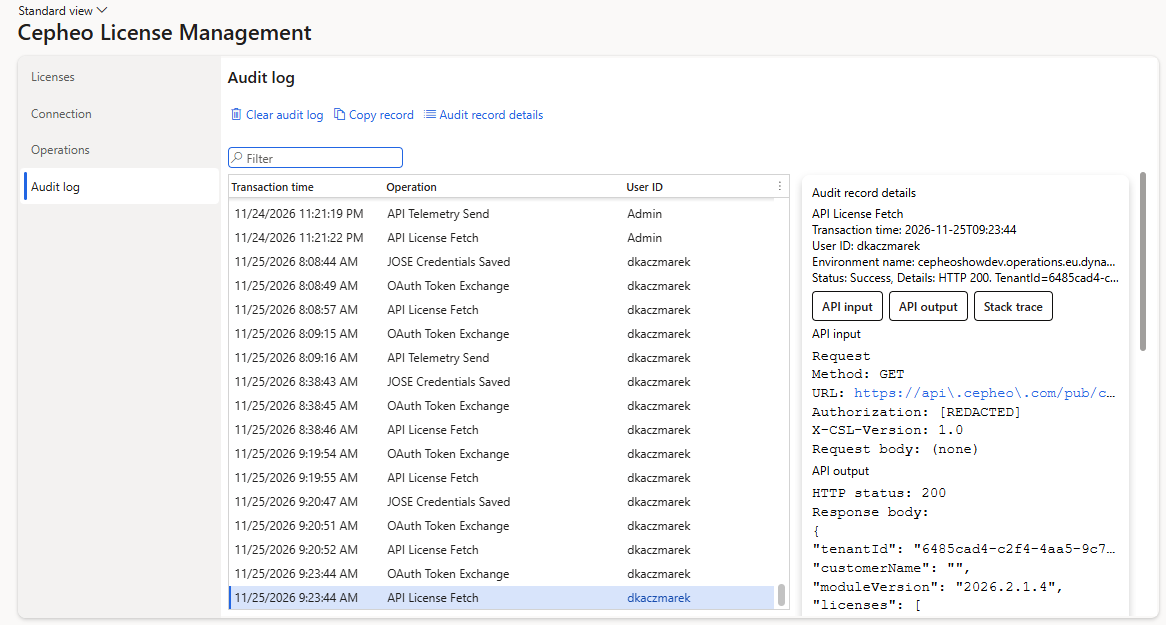
- Open Cepheo License Management > Audit log.
- Filter by the relevant operation/time and select a row.
- Read the selected-record summary, API input, API output and available stack trace. Use Audit record details for the read-only detailed view.
- Copy record opens a text dialog. Select and copy the text yourself; it does not send anything.
Contact support
When the overview needs attention, Get support opens a prefilled email draft with connection/product issues, environment, versions and last refresh. Review before sending; long summaries may be shortened.
Include the installed CSL version, UTC time, intended licensing environment, exact error/stage, HTTP status and relevant audit details. Never include a plaintext secret, bearer token, private key or full credential bundle. Review real customer identifiers before sharing; these screenshots use Cepheo example data.
Clear old records carefully
Clear audit log deletes records older than Days to keep; the default is 30. Zero purges all entries. Check retention requirements before deletion. Stored timestamps are UTC; normal FO display settings can apply.
For common errors, see Troubleshooting.
