Purchase agreement
 Updated
by Dawid Kaczmarek
When creating a purchase agreement and adding a purchase agreement line, the lookup for item numbers will show all item, or the items allowed to buy from the vendor (select among Approved products), according to the user choice of filtering the lookup.
When the wanted item is selected or typed in, the primary AVA ID inclusive data setup for the AVA ID will be inserted into the purchase order line.
If more than one AVA ID is available, a lookup for AVA ID can be used to select another allowed AVA IDs for the agreement line. If another AVA ID is selected, all information for the new AVA ID will be updated for the agreement line.
Printing purchase agreement
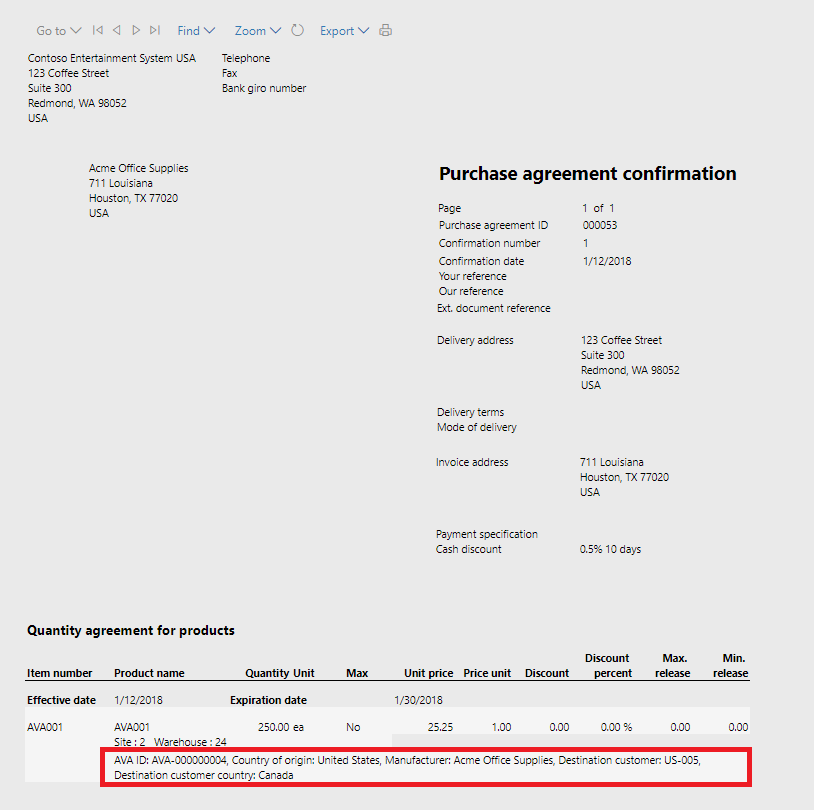
When printing or reprinting the purchase agreement, original or from journals, information of the AVA number, country of origin, manufacturer, customer destination country and customer will be printed for each agreement line.